標題 class
當我們想設定文字大小為標題的大小,卻無法使用標題標籤時使用。
1
2
3
4
5
6
| <p class="h1">h1. Bootstrap heading</p>
<p class="h2">h2. Bootstrap heading</p>
<p class="h3">h3. Bootstrap heading</p>
<p class="h4">h4. Bootstrap heading</p>
<p class="h5">h5. Bootstrap heading</p>
<p class="h6">h6. Bootstrap heading</p>
|
Display 文字
當想要字體更大,粗細更細的文字時,使用 display-*
1
2
3
4
5
6
| <h1 class="display-1">Display 1</h1>
<h1 class="display-2">Display 2</h1>
<h1 class="display-3">Display 3</h1>
<h1 class="display-4">Display 4</h1>
<h1 class="display-5">Display 5</h1>
<h1 class="display-6">Display 6</h1>
|
1
2
3
4
5
6
7
8
| $display-font-sizes: (
1: 5rem,
2: 4.5rem,
3: 4rem,
4: 3.5rem,
5: 3rem,
6: 2.5rem
);
|
行內文字元素
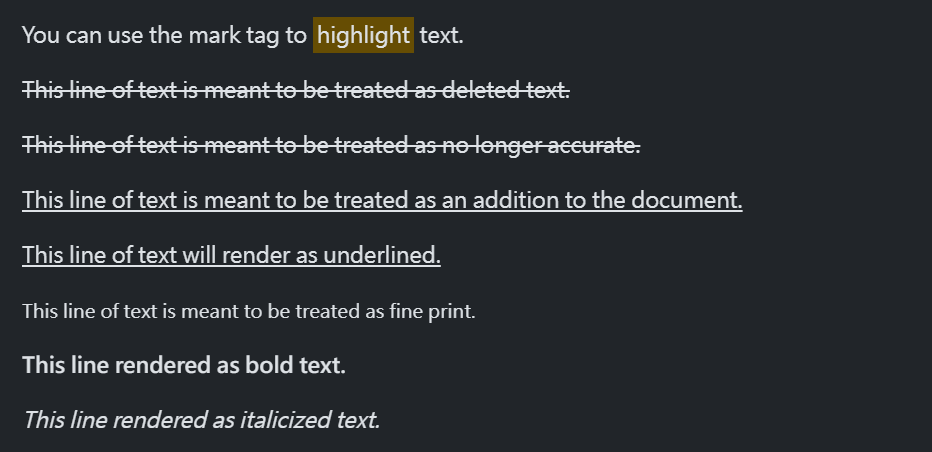
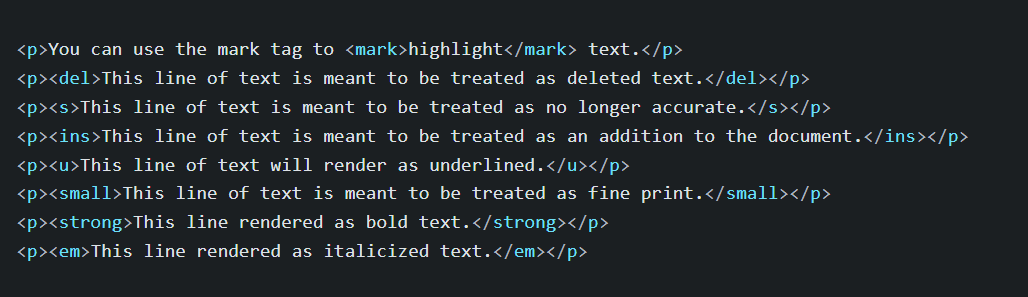
<mark>: 替元素加上黃底凸顯, 相對的class為 .mark<small>: 表示網頁細則內容,如 copyright。 相對的class為 .small<s>: 表示不再準確的資訊,會在文字加上 刪除線。
取消列表樣式
當要取消列表預設樣式,在 ul 或 ol 加上 .list-unstyled
1
2
3
4
| <ul class="list-unstyled">
<li>This is a list.</li>
<li>This may still come in handy in some situations.</li>
</ul>
|